When someone reads a useful comment from your team and opens the employee’s LinkedIn profile, what will they learn about the person and the company behind them? A clear role, a recognizable company and relevant work can help the visitor understand who is speaking.
For a large sales, marketing or customer success team, the challenge is seeing where those details are missing across many profiles. Linkwiz’s Profile Optimization report brings the checks and the supporting profile evidence together, so the team can decide what to update.
Consider Walt, a fictional entertainment company. Its eight employees and every result below are illustrative. This time we follow what a visitor sees after opening the team’s profiles.
The same Walt team appears in our article on external LinkedIn interactions.
Start with the profiles customers are likely to open
Walt creates a report in Linkwiz and selects the eight employee LinkedIn profiles it wants to review. The report shows results for the company and for each person. Profile Optimization checks 19 aspects of those profiles across three categories: Profile, Engagement and Networking. Here, Walt concentrates on the 11 Profile checks, which include Headline, Cover and Featured.
The question is practical: can someone who encounters Belle’s comment or Elsa’s post tell where they work and find an example of what Walt does? A company score can point to a change, but the individual findings show what needs attention.
Find the profile gaps several employees share
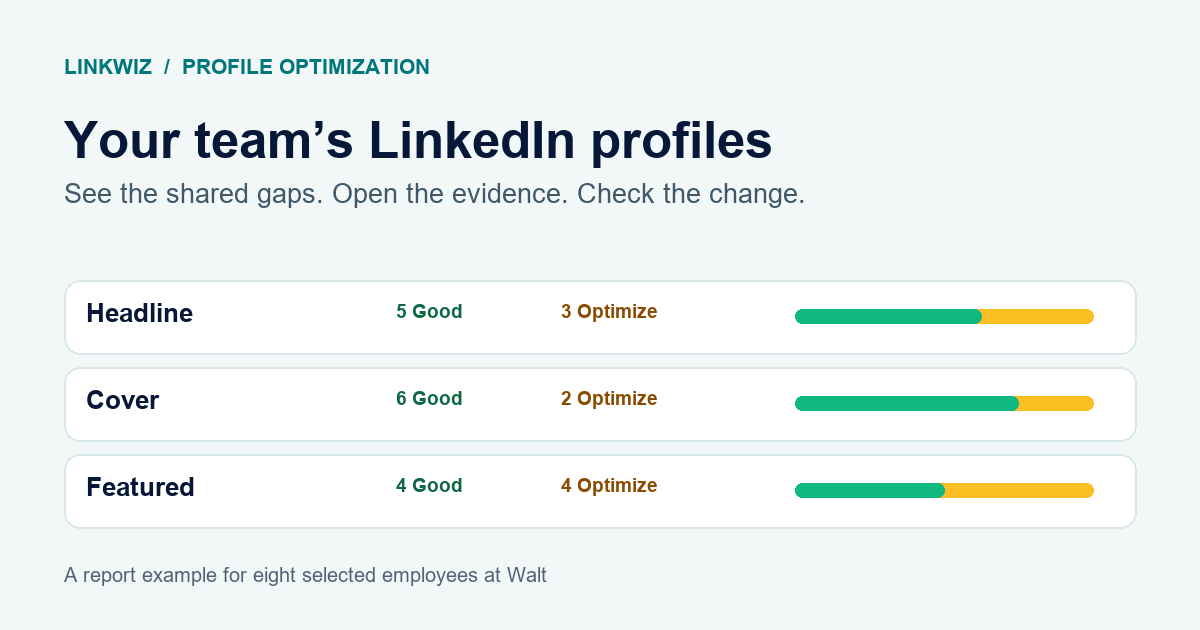
In Optimization opportunities, each check shows how many selected employees have a Good result and how many have an Optimize result. Walt sees three headlines that do not identify the company, two covers that need an update and four Featured sections without a relevant company example.
Headline
Does the headline mention Walt?
Cover
Does the cover reflect Walt?
Featured
Does Featured show a Walt related example?
Those results suggest different responses. Marketing can supply an approved cover asset and a short selection of current partnership or campaign posts. Employees can then choose what fits their own roles and write their own introductions. Headlines need a more personal review: a useful recommendation should retain the employee’s expertise while making the connection to Walt clear.
The counts tell Walt where a shared resource may help. They do not say that one approved sentence belongs on every profile.
For a separate look at real profiles, read our review of 29 professionals’ LinkedIn profiles.
See who needs which update
Walt can select an Optimize count to see the affected people. The report’s Matrix and Profiles views connect the result to a particular employee, rather than leaving the team with three totals and no next action.
In this example, Belle and Arielle both need a headline update. Elsa needs attention on her cover and Featured section. Woody and Max have a Featured finding, while Finn’s cover needs an update. Their roles matter: the post a customer success manager features may differ from a marketing manager’s campaign example.
PROFILE CHECK MATRIX
Who needs which profile update
Eight employee profiles. Select a result to inspect it.
| Employee | HeadlineProfile check | CoverProfile check | FeaturedProfile check |
|---|---|---|---|
| Mina MossSales Director | Good | Good | Good |
| Belle BeaumontAccount Executive | Optimize | Good | Optimize |
| Elsa NorthMarketing Manager | Good | Optimize | Optimize |
| Woody WestCustomer Success Manager | Good | Good | Optimize |
| Arielle ReedAccount Executive | Optimize | Good | Good |
| Finn FlintContent Marketing Manager | Good | Optimize | Good |
| Max GoodeCustomer Success Manager | Good | Good | Optimize |
| Olivia OakMarketing Operations Manager | Optimize | Good | Good |
SELECTED PROFILE RESULT
Belle Beaumont · Headline
Optimize · Belle’s headline does not identify Walt. Her current wording and recommendation appear below.
Select Belle’s Headline result in the example. The evidence below shows her current wording, why the check flagged it and the suggested update. Selecting Elsa’s Featured result shows a different problem. The matrix makes it possible to find the person behind a team pattern and then inspect the actual profile detail.
Read the evidence before changing a profile
Belle’s current headline reads, “Entertainment partnerships | Making ideas happen across teams.” It communicates the kind of work she does, but someone arriving from a LinkedIn conversation would not know she is an account executive at Walt. The Headline finding identifies that missing company connection. Its Recommended next step keeps Belle’s wording and adds her role and company.
Elsa’s Featured section has no item in the example. The report shows the empty section as evidence and recommends adding a company related story, customer lesson or post in her own words. Marketing could offer a few suitable Walt posts; Elsa should choose one that represents her work.
Does the headline mention Walt?
“Entertainment partnerships | Making ideas happen across teams”
Keep Belle’s wording and add her role and company: “Account Executive at Walt | Entertainment partnerships across teams.”
Entertainment experiences, stories and partnerships.
Does Featured include a Walt related example?
No item is shown in Elsa’s Featured section.
Add a relevant Walt campaign or partnership post with a short introduction in Elsa’s own words.
Entertainment experiences, stories and partnerships.
These examples call for different fixes. Belle can adjust a line of text. Elsa needs a relevant piece of work to feature. Opening the evidence prevents the team from treating every Optimize result as the same kind of task.
Give employees useful material, then let them make it their own
After reviewing the findings, Walt’s marketing team prepares a current cover asset and a small set of company stories worth featuring. Sales and customer success managers check that suggested examples fit their teams’ responsibilities. Each employee decides how to describe their role and which work to highlight.
Linkwiz shows the evidence and recommendations. Walt’s people make the edits on LinkedIn. That distinction matters because a profile should still sound like the professional behind it, even when the company helps provide the material.
Check what changed after another scan
When the report has another scan, Walt uses Report month and Compare to examine the same selected team over time. The company’s overall result moves from 61% to 64% of comparable checks passed. Within the Profile category, it moves from 59% to 66%. The Engagement and Networking categories remain at 63% each.
The totals lead back to specific changes. Belle and Arielle now identify Walt in their headlines. Elsa has updated her cover and Featured section, and Woody and Max have added relevant work to Featured. Walt can reopen their individual findings to inspect the new evidence. Olivia’s headline, Finn’s cover and Belle’s Featured section still need attention.
Across these three checks, six findings are resolved and three clear items remain. A higher score reflects more report checks passed. It does not establish that more customers replied or bought anything.
Explore the Profile Optimization demo to see the checks, individual evidence and comparison views.
See how these results fit into a company report on the profile analysis page.