
Linkwiz guides
Add an AI agent to optimize your team’s LinkedIn profiles and activity.
Connect Linkwiz to your AI assistant or a team communication platform like email or Slack so your team can discuss profile findings, find relevant posts and get practical help with their next steps.
Team leaders can review Linkwiz reports with a connected AI assistant to decide where support is needed. Profile checks, evidence and recommended next steps make it easier to prioritize.
Employees can discuss a profile update or a relevant post in Slack or their AI assistant. Linkwiz supplies the findings and Activity Tracking posts; the assistant helps them improve their profile or draft a contribution in their own voice.
Linkwiz context
Reports + Activity Tracking
Profile findings, evidence, recommended next steps and captured company or colleague posts.
A conversation
AI assistant or Linkwiz in Slack
Discuss what a finding means, share your experience and get help with wording.
Your next step
Review and act
Choose the update or contribution. Make the profile edit or publish it yourself on LinkedIn.
Choose where your team will get help
Choose a route that fits how your team already works. A leader who reviews reports in ChatGPT can connect it there. A team that spends its working day in Slack can make help available through the Linkwiz app.
| Integration | How your team can use it |
|---|---|
| ChatGPT | Discuss accessible reports, work through profile findings and prepare activity suggestions. Connect through Linkwiz MCP. |
| Claude | Review report evidence and work through profile or activity questions. Connect through Linkwiz MCP. |
| Codex — Preview | Work with authorized report data and prepare workflows or internal tools. Connect through Linkwiz MCP; setup is currently labelled Preview. |
| Slack | Ask Linkwiz questions about a selected report in a private conversation, with profile advice and help discussing engagement opportunities. |
| Microsoft Teams — Soon | A planned team-chat route. Setup instructions will be available with the integration. |
| Email: Gmail, Microsoft 365, etc. — Soon | A planned email route. Setup instructions will be available with the integration. |
MCP, short for Model Context Protocol, is the connection that lets a compatible assistant use Linkwiz tools and the workspace data you authorize. It lets the assistant retrieve report context during the conversation. Slack provides its own Linkwiz conversation experience.
See the integrations overview for the available routes and the Linkwiz MCP page for how the assistant connection works. An exported personal plan provides another option for employees who use ChatGPT without a Linkwiz connection; we cover that below.
Build your first report in Linkwiz, then connect your assistant
Start in the Linkwiz interface. Create a company report using your company website or LinkedIn Page, select the employees to include and review the available results. The team profile audit guide explains the checks and how to read them.
This gives you a clear starting point before you connect an assistant: a report you recognize, the people it includes and findings you can open yourself.
Connect an AI assistant
A Linkwiz workspace owner or admin follows the setup guide for ChatGPT, Claude or Codex. Sign in with Linkwiz and approve the intended workspace and permissions. The MCP connection uses your Linkwiz login; it does not require a REST API key. Your plan must include the required API access, and the assistant's account or organization must support the connection.
Start with a simple question to confirm the context:
Prompt: Which Linkwiz workspace is connected? List the reports I can access, including their company and report link, without changing anything.
Then choose your existing report. Reading it uses stored results. Ask the assistant to include the analysis date and identify profiles whose results are still pending.
Connect Slack
In the intended Linkwiz workspace, an owner or admin opens Workspace settings → Integrations → Slack → Connect Slack, selects the Slack workspace and completes authorization. Slack may require approval from its own administrator. Your company needs an active Linkwiz subscription or trial.
Open Linkwiz in Slack and choose Home → Discuss report. Select an available report and begin a private conversation. The Slack integration guide explains setup and report access.
Choose the report you want to discuss
Connect your workspace in Linkwiz, then open Linkwiz Home in Slack and choose Discuss report.
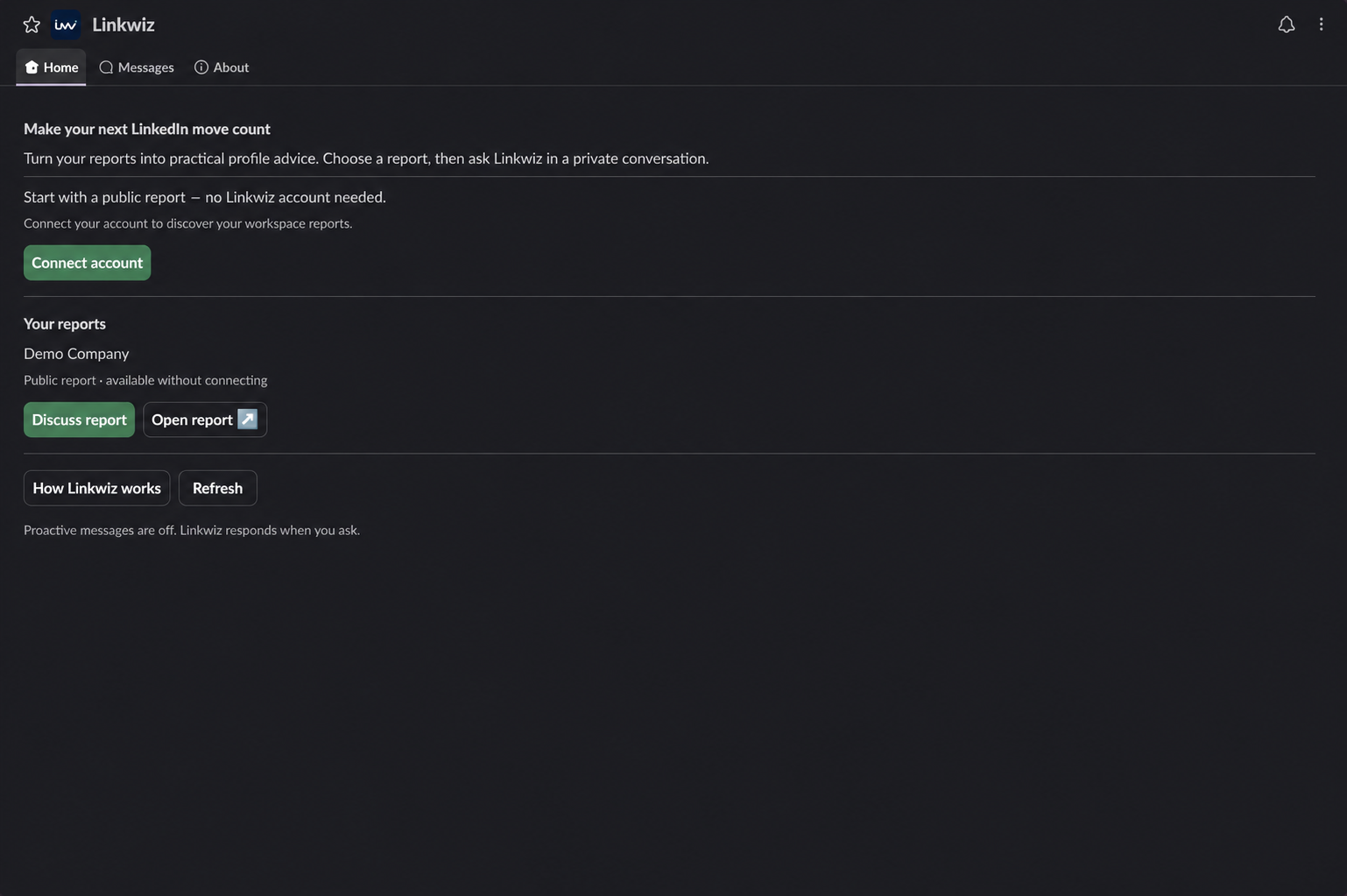
Review and manage reports through conversation
Once connected, you can ask questions across the reports your authorized workspace makes available. For example, find the reports for a company, check which employees they include, summarize profile findings or open the supporting evidence. You can also ask about captured posts, comments, reactions and reposts.
The assistant can read accessible reports and help compare their findings. Where historical results are available under your plan, it can review different observation periods too. Keep the people, checks and periods clear so a difference in coverage is not mistaken for a profile improvement.
Prompt: Review the accessible reports for our company. For each report, show who is included, the available analysis dates and the main profile findings. Link to the supporting evidence and identify missing or pending results before suggesting priorities.
Add supplied profiles to an existing report
An authorized owner or admin with the required permissions can ask the MCP-connected assistant to prepare profile additions. Supply the LinkedIn profile URLs and identify the report. Review the exact proposal in Linkwiz before approving it. Accepted new or restored profiles enter the scan queue under your existing plan and allowances; a queued scan is not a completed result.
Prompt: Prepare to add these LinkedIn profile URLs to our selected report: [paste URLs]. Show the proposed additions and give me the Linkwiz approval step. Wait for that approval before making the change.
MCP also supports preparing a new company report. Creating your first report in the interface is a useful way to get started; the conversational route can help with later report administration.
Slack's administrative actions are more limited. Where enabled, connected Linkwiz owners and admins can request profile additions to allowed reports or create an empty private report. Those changes also require review and confirmation in Linkwiz. An employee asking for advice does not receive those admin permissions.


These capabilities concern Linkwiz reports. The assistant helps discuss findings and draft wording; employees make their profile edits and publish their contributions on LinkedIn themselves. See the MCP capability documentation for the supported actions.
Help employees work through profile updates
Start with a person's finding and its Evidence and Recommended next step. A headline that leaves out the company needs different help from a missing cover image or an empty About section.
Ask the assistant to explain the finding, then discuss the information needed for the update. Before suggesting a headline, it can ask about the employee's role and the customers they work with. For a missing About section, it can ask about their responsibilities, relevant experience and results. The About check establishes whether the section exists; writing advice helps the employee decide what to put in it.
Prompt: Use my Headline finding in the selected report to help me improve it. Explain the evidence and recommended next step. Ask about my role and who I help before suggesting wording that includes my company and sounds like me.
Passing colleagues can provide useful examples. For a cover image, look at profiles that passed the Cover check. For a headline, find someone in a similar role. The employee can borrow the company connection and clarity while keeping their own expertise and voice.

Message Linkwiz
The team profile updates guide covers this process in more detail, including native recommendations, passing colleagues' examples and the individual profile guides.
Turn relevant posts into a conversation
Linkwiz's Activity Tracking helps you find captured company and colleague posts. The connected assistant or the AI-powered Linkwiz conversation in Slack can then discuss which posts fit an employee's work and what they could contribute.
For example, a company post asks what to agree with a customer before video production starts. Belle, an account executive, regularly discusses briefs with customers. An assistant can ask what question she has heard recently, then help turn that experience into a comment. Her experience supplies the substance; the conversation helps her express it.
Prompt: Find recent captured company and colleague posts in our selected report that relate to my work as an account executive. Include the source links and dates. Help me choose one, then ask about my customer experience before we draft a comment or repost.
The same approach can support a colleague's post, a repost with useful context or an original post. Review the source post and the draft, then decide what to share. The team engagement review guide explains the activity findings, while the weekly recommendations guide shows how to make these conversations a regular habit.
Turn your experience into a comment
Message Linkwiz
Make the agent available across your team
A company connection should lead to something employees can actually use. Give people a clear place to ask questions, explain which reports they can access and provide a starting question that matches their work.
Make Slack help available to employees
With an active company connection, employees can discuss an admin-selected public report without linking a personal Linkwiz account. They can choose their profile in the report and ask privately about optimization or activity. Selecting a profile personalizes the conversation; it does not verify ownership of that LinkedIn profile.
Private reports require a verified personal account connection and current workspace permission. Employees use Connect account, complete the identity check and return to Slack Home to Refresh the available reports. If a report is missing, ask the Linkwiz admin to check availability and access.
| Person or access route | What they can do |
|---|---|
| Employee using a shared public report | Ask privately about a selected profile, its findings and captured activity, while company access is active. No individual Linkwiz subscription or separate OpenAI API key is needed. |
| Verified member with private-report access | Discuss private reports their linked account and current workspace permissions allow. |
| Connected Linkwiz owner or admin | Configure the company connection and public report availability, and use supported administrative report actions where enabled. Slack administrator status alone does not grant Linkwiz admin rights. |
Include weekly activity recommendations in the team's rollout where scheduled Slack delivery is enabled. Each employee opts in personally, receives posts worth reviewing and can continue privately with Linkwiz to discuss what to contribute. Installing the app does not automatically subscribe everyone. Check the current Slack integration's availability before introducing subscription instructions; customer timed delivery is not yet listed as released in its setup documentation.
Set up monthly and weekly tasks in a connected assistant
For an eligible user whose GPT is connected to Linkwiz through MCP, the assistant's scheduling feature can make report reviews and post discovery recurring tasks. Use the same approach in another connected assistant where its scheduling features support the required tools.
A monthly task can review current findings against last month's available results, explain what changed and identify remaining support needs. A weekly task can find captured posts worth interacting with and invite a discussion about a contribution.
Monthly task prompt: On the first Monday of each month, use Linkwiz to review our selected company report against the previous month's available profile findings. Keep the employee group and checks consistent. Summarize improvements, remaining findings and missing data, with source links and analysis dates. Use stored results and do not start scans or change the report.
Weekly task prompt: Every Monday morning, use Linkwiz to find recent captured company and colleague posts relevant to my role. Return up to three posts worth engaging with, with their links, dates and why each is relevant. Invite me to discuss my experience before helping draft a comment, repost or post. Do not publish anything or change the report.
Test each prompt in a normal connected conversation first. Scheduling depends on the assistant's account, workspace permissions and available tools; local tasks may require the app and computer to remain running. A task can review the results available to it, including permitted history. Reading a report does not itself refresh the scans. See scheduled-task guidance, the profile progress guide and the weekly recommendations guide.
Give employees without a connector a personal plan
Export a personal profile optimization plan for each employee. They can upload it to their own ChatGPT account and ask it to guide them through the changes, even if they have no Linkwiz connector installed.
Prompt: Follow the attached plan to optimize my LinkedIn profile agentically.
The file provides the employee's findings and instructions at the time of export. It does not give ChatGPT a live connection to later reports. Share a fresh plan when newer findings change the work to do. The profile updates guide shows how this fits alongside Linkwiz's recommendations and private Slack help.
Choose the route that makes participation easy for each person: Slack for questions during the working day, a connected assistant for recurring reviews and activity ideas, or an uploaded plan for a focused profile update. Start with your company report and give everyone a useful way to take the next step.
Start a report