
Linkwiz guides
Help everyone on your team engage on LinkedIn with weekly recommendations
Give each employee relevant posts, a useful starting point and AI help to turn their experience into a contribution.
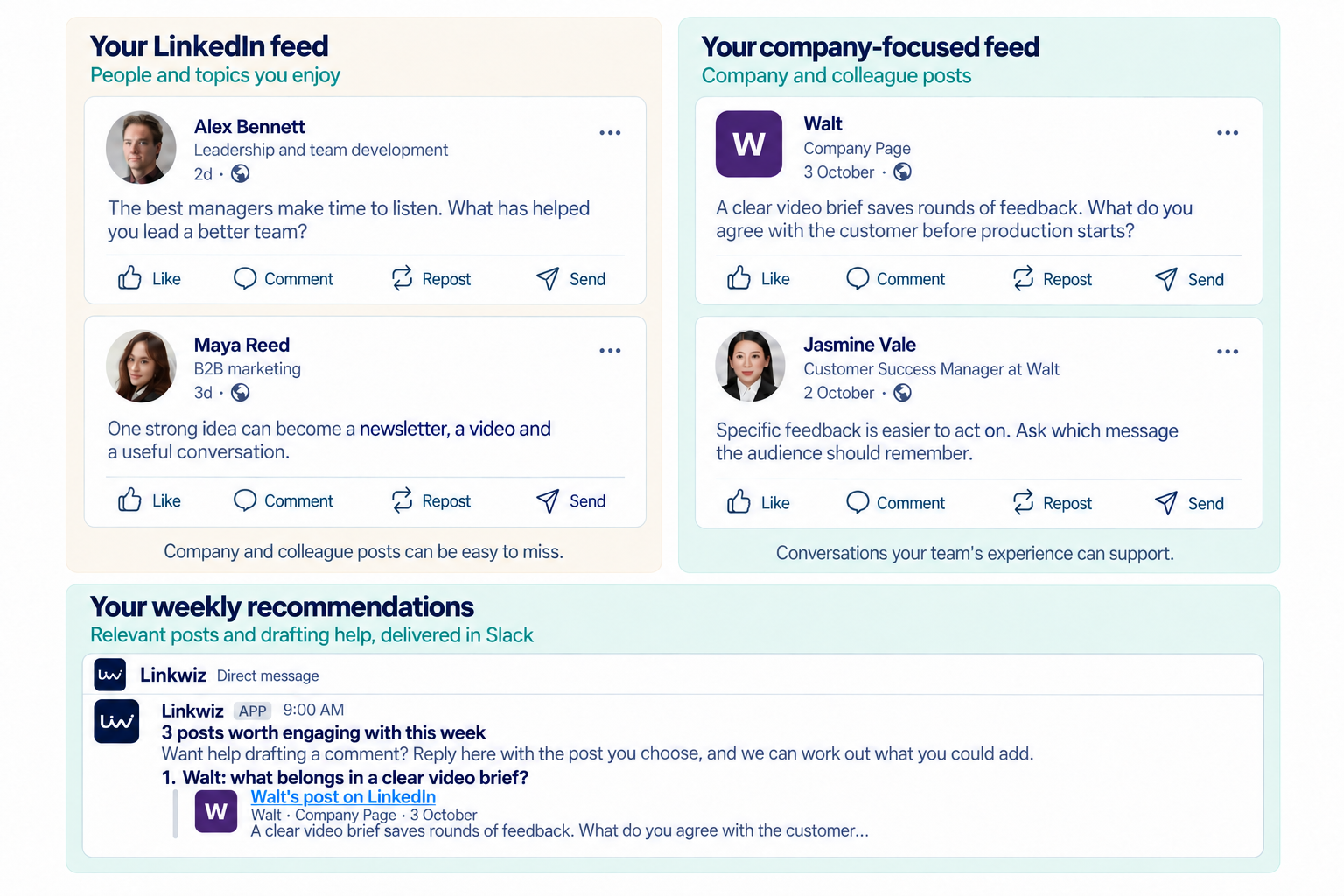
LinkedIn’s feed is built around the people and topics you find relevant. That makes it useful for following creators you enjoy, learning from peers and discovering ideas. But a feed shaped by each employee’s interests is not a reliable way to make sure everyone sees the posts that matter to your company.
A company announcement can slip past a salesperson who could answer a customer’s question about it. A colleague’s useful post may never reach someone with a practical example to add. Employees can be active on LinkedIn and still miss opportunities to support the company’s message or join conversations relevant to their work.
Linkwiz’s Activity Tracking gives you a focused feed around your company and employees, so those conversations are easier to find. Connect Linkwiz to an AI assistant or use the Linkwiz agent in Slack to turn posts from that feed into weekly recommendations. The AI can help each person explore why a post fits their work and what they could contribute, then continue the conversation about a comment, repost or post of their own.
Select the image to enlarge it.
Start with a Linkwiz company report that includes all your employees. Use the report to understand profile and engagement findings, and Activity Tracking to find company and employee posts. The team engagement review guide explains those findings in more detail.
The people, company and activity in the examples below are fictional.
Give everyone a useful way to join the conversation
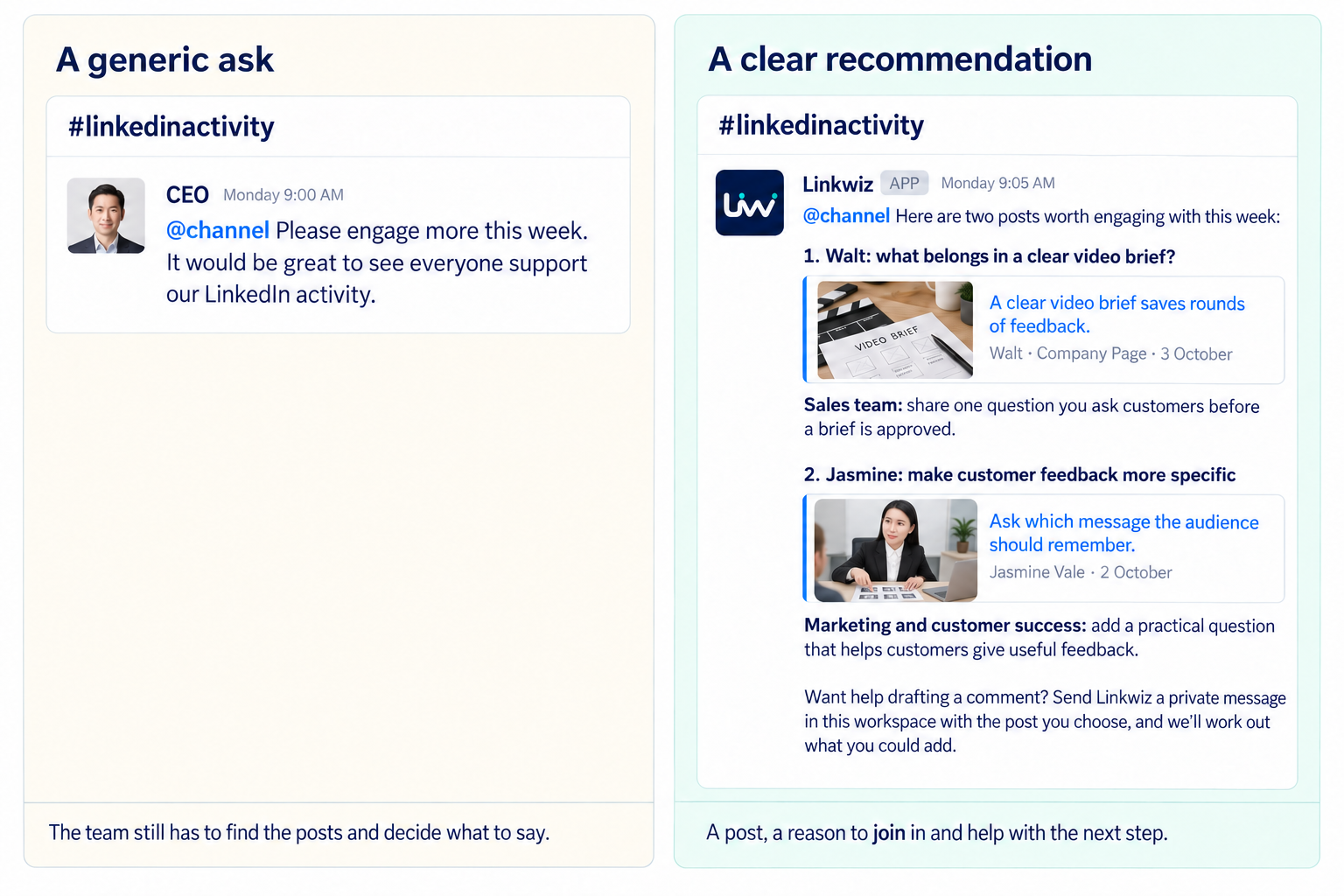
If you’ve worked at a company that’s active on LinkedIn, you may recognize this message. The CEO posts in Slack: “Please engage more this week.” Everyone is encouraged to support the company’s activity.
You want to help, but there are still a few things to work out: which post to open, why it matters and what you could add. Between meetings and customer conversations, it can easily become something you plan to come back to later.
Now imagine a different message in the same channel. The Linkwiz agent in Slack uses posts from the Linkwiz feed to prepare suggestions for the team. It shares the company’s video-brief post and Jasmine’s customer-feedback post, with ideas for the people whose experience fits each topic. You have a post to open and a clear reason to join the discussion.
Select the image to enlarge it.
Belle sees the Slack agent’s video-brief recommendation and thinks of a question a customer recently asked her. She can bring that experience into the comments. If she wants help finding the right words, she can message the Linkwiz agent privately in Slack, talk through the example and work on a draft.
A colleague might choose Jasmine’s post instead and share a question that helps customers give clearer feedback. Someone who already posts regularly may spot an idea for a repost or a new post of their own. Each person gets a starting point and can make the contribution their own.
Find relevant posts and explore what you could contribute
Belle opens Linkwiz’s Activity Tracking feed and finds a company post about agreeing a clear video brief before production starts. The feed brings the post into view, alongside activity from the company and her colleagues.
To work out how she could contribute, Belle turns to ChatGPT, Claude or Codex connected to Linkwiz, or messages the Linkwiz agent privately in Slack. The AI can use posts from the feed and discuss how they relate to her work.
Belle asks: “Help me think of a useful comment on this video-brief post. I’m an Account Executive.”
A clear video brief saves rounds of feedback. What do you agree with the customer before production starts?
Message Linkwiz
The agent asks what customers have asked her about agreeing the audience or message before production. Her answer gives them something concrete to develop into a comment.
A marketing colleague could approach the same post differently. The conversation helps each person connect the topic to their own experience. The comments guide offers further examples of useful contributions.
Receive weekly recommendations in your own AI assistant
Employees can connect Linkwiz to ChatGPT, Claude or Codex through MCP and use their own account to prepare weekly recommendations. MCP is the connection that lets a supported assistant work with accessible Linkwiz report data and posts from the Activity Tracking feed. The integrations page explains the available connections.
Give the assistant the employee’s profile and role, then schedule a recurring task to prepare a few relevant suggestions each week. For example, Belle could receive recommendations every Monday morning, ready to discuss when she has time to contribute.
Each result should include the post’s author, date and link, why it fits the employee’s work, and an idea to consider. A company post might invite a comment. A colleague’s practical lesson might suit a repost with a short explanation of why it matters. A question raised in either could become an original post based on the employee’s experience.
Prompt: Every Monday, use my Linkwiz report and the recent posts available to you to recommend a few useful LinkedIn contributions for this week. For each, include the post link, author, date, why it fits my role and a possible comment, repost angle or original-post idea. Invite me to discuss what I could add. Ask about my experience before drafting personal claims. If you cannot access the report or find suitable recent posts, tell me.
Test the prompt in a normal conversation before scheduling it. Check that the assistant can access the right report and provide usable source posts. Scheduling and connected-tool access depend on the assistant, plan and workspace. ChatGPT and Codex scheduled tasks and Claude Cowork recurring tasks have different execution requirements; tasks that need local files may also need the computer and app available.
When a weekly result arrives, continue the conversation about the suggestion that interests you. The task finds a starting point; your questions and experience help turn it into something worth sharing.
Subscribe to weekly recommendations in Slack
Where scheduled delivery is enabled, employees who prefer to work in Slack can opt in to weekly Linkwiz notifications. The Linkwiz agent in Slack uses AI to prepare recommendations from posts in the Linkwiz feed. Employees can discuss what to comment, write in a repost or develop into a post of their own.
For Belle, a weekly message could include the company’s video-brief post and a colleague’s post about customer feedback. Each recommendation explains why the topic relates to her work, so she can choose the one where she has a useful perspective.
Your weekly starting points
Message Linkwiz
The conversation can begin with a simple request: “Help me think of a comment on the video-brief post.” The agent can discuss the post with the employee, ask a relevant question and help draft a response using what they share. The Slack integration brings this support into a tool the team already uses.
Work out what to say and get help drafting it
This is where the recommendation becomes personal. Ask the assistant or Slack agent to help you find a point, rather than immediately asking it to produce a finished comment. A useful question connects the post to something you actually know.
For the video-brief post, the agent asks Belle: “What has a customer recently asked you about agreeing the audience or message before production starts? Share one example, and I can help turn it into a short comment.”
Belle replies: “A customer asked whether one video could work for both new prospects and existing customers. We agreed the primary audience first, then chose the message for that audience.” That gives the draft a specific experience to draw on.
Turn your experience into a comment
Message Linkwiz
Add a comment to the discussion
Belle’s draft answers the post’s question with a recognizable customer situation. It is short enough to read in the discussion and specific enough for someone else to respond to. She can adjust the wording to sound like herself before posting it.
Repost with your own thoughts
If Belle wants to share the company post with her network, she can ask for a different treatment: “Use my example to draft a short introduction for a repost. Explain why agreeing the audience matters without repeating the whole post.”
The result could begin: “When a customer wants one video to do several jobs, the first conversation is about who it is for. Agreeing that helped us choose the message. This post explains what else belongs in a clear brief.”
Add your perspective above the company post

Repost with your own thoughts · Draft
When a customer wants one video to do several jobs, the first conversation is about who it is for. Agreeing that helped us choose the message. This post explains what else belongs in a clear brief.
Write an original post with a relevant mention
The same experience could become a standalone lesson. Belle could explain the customer’s question, the decision they made and what another team could try. Mentioning her company makes sense if she is describing how its team works; a colleague’s mention belongs when that person contributed to the story.
Prompt: Turn the customer example I shared into a short LinkedIn post. Explain the question, how we approached it and a practical takeaway. Ask for any missing context before adding details. Include a company or colleague mention only where they are part of the story.
For a fuller writing workflow, use the LinkedIn content guide. Whichever format you choose, review the draft, remove anything you cannot stand behind and publish it yourself in LinkedIn.
See how team participation develops over time
Once employees have relevant posts and help contributing, review how participation develops across the team. Are more people joining in? Are comments and reposts becoming part of the routine? Is that activity supporting your company and colleagues? Linkwiz’s Activity Tracking lets you review captured activity across the selected employees, explore the interactions behind it and look at the pattern over time.
Start with the team overview
Open Activity distribution to see active profiles, original content, engagement with others and total captured activity within your filters. The activity mix separates posts, reposts, comments and reactions. The per-profile view shows how that activity is distributed across employees.
Read participation alongside volume. In this fictional September example, all four employees contributed, but Arielle accounts for nine activities while Peter accounts for one. A higher team total can still come from a small group. Looking at the distribution helps you decide who might benefit from more relevant posts or help getting started.
Activity distribution
September · 4 employee profiles
Active profiles
4 of 4
100% contributed
Original content
1
5% of tracked activity
Engagement with others
20
95% of tracked activity
Total captured
21
Within the current filters
How the team participates
Posts
1
Reposts
3
Comments
5
Reactions
12
Activity distribution by profile
Belle Beaumont
0 posts · 0 reposts · 1 comment · 4 reactions
5

Arielle Reed
1 post · 2 reposts · 2 comments · 4 reactions
9

Peter Panley
0 posts · 0 reposts · 0 comments · 1 reaction
1

Jasmine Vale
0 posts · 1 repost · 2 comments · 3 reactions
6
See where the participation goes
Open Interactions → Team & company to review support for the company Page and colleagues. The interaction mix separates mentions, comments, reposts and reactions; the targets and directional relationships show who engaged with whom. Use External network separately when reviewing participation beyond the team.
Here, ten interactions involve Walt’s Page and eleven involve colleagues. This adds context to the activity total: employees are joining conversations around both the company and the people behind it. Activity counts and interaction counts are different measures; one piece of content can involve several people. The team engagement review guide explains how to investigate the supporting activity.
Interactions
September · 4 employee profiles
Team & company
Observed interactions
21
Across the current filters
Unique targets
5
Colleagues and company Page
Participating profiles
4 of 4
100% participated
How the relationships are formed
Mentions
1
Comments
5
Reposts
3
Reactions
12
Company and colleague interactions
Walt company Page
10
Colleagues
11
Review the pattern over time
In Content patterns, the publishing cadence chart shows observed activity by month. It covers original posts, repost commentary and comments with exact or estimated dates. Select a month to open the activity behind that bar, then read what people contributed. Reactions are part of the activity overview, so its total is broader than the authored content shown here.
Use the date-range presets or custom start and end dates to review comparable periods. Keep the same employees and activity filters, compare complete months and treat a current partial month as month to date. Look for a developing routine and changes in the mix of contributions, rather than judging the team by one busy week.
Content patterns
June–September · complete months
Publishing cadence
Observed activity over time
Uses exact and estimated dates only
6
Jun 2026
5
Jul 2026
7
Aug 2026
9
Sep 2026
Posts, repost commentary and comments · 4 employees
In the report, select a month to open its supporting activity.
Use the findings to improve the next round
Open contributions alongside the totals. Belle’s October comment, for example, brings a customer question into the video-brief discussion after she talks it through with the Slack agent. That tells you more about her contribution than the count alone. Keep actions employees take separate from the reactions, comments or reposts their content receives.
Use these patterns to decide what would help next week. Some employees may need more relevant posts; others may benefit from help turning their experience into a comment or post. Bring the findings into ChatGPT, Claude or Codex connected to Linkwiz, or a conversation with the AI-powered Linkwiz agent in Slack, to discuss the next round of recommendations and drafting support.
Start a report