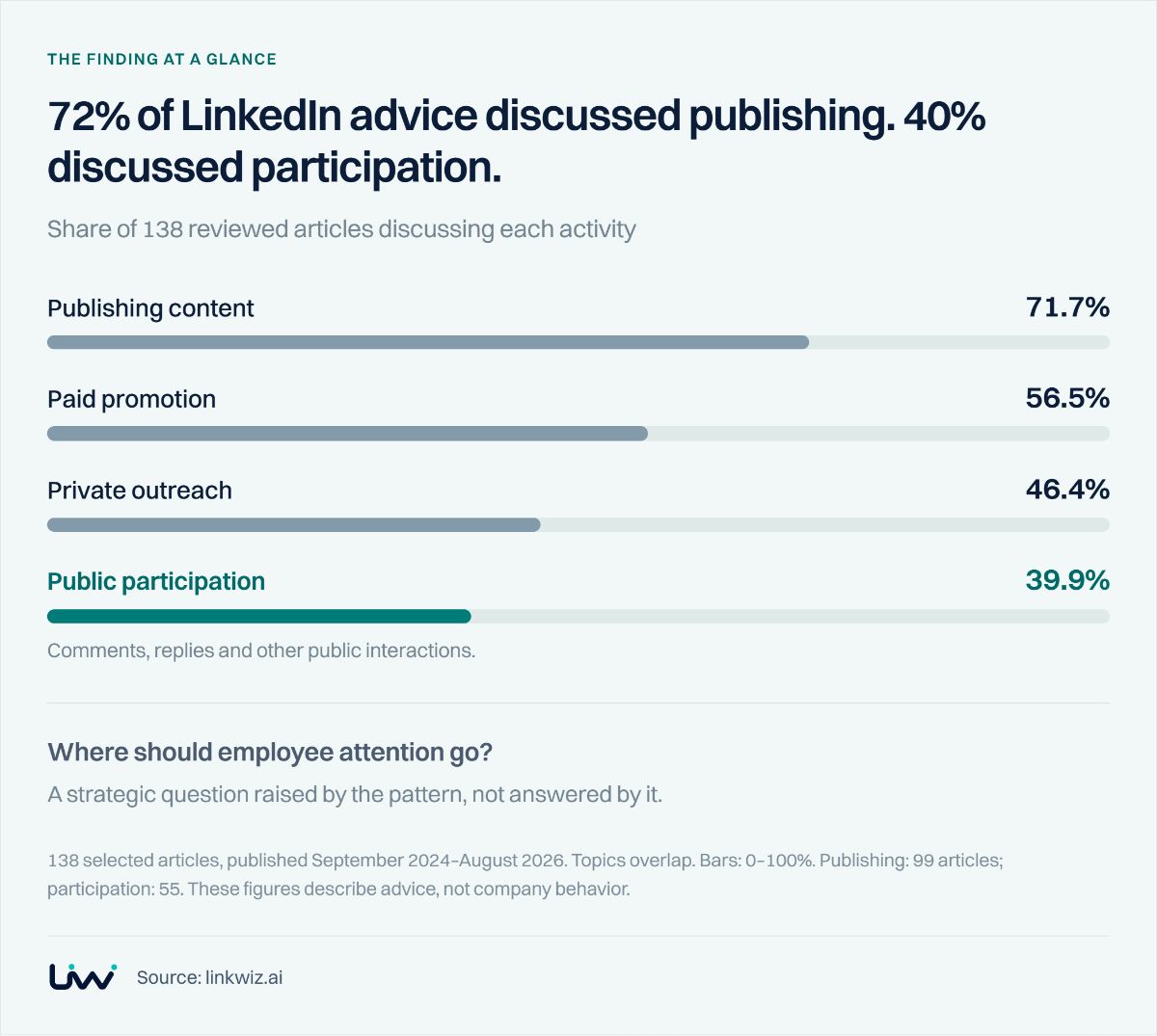
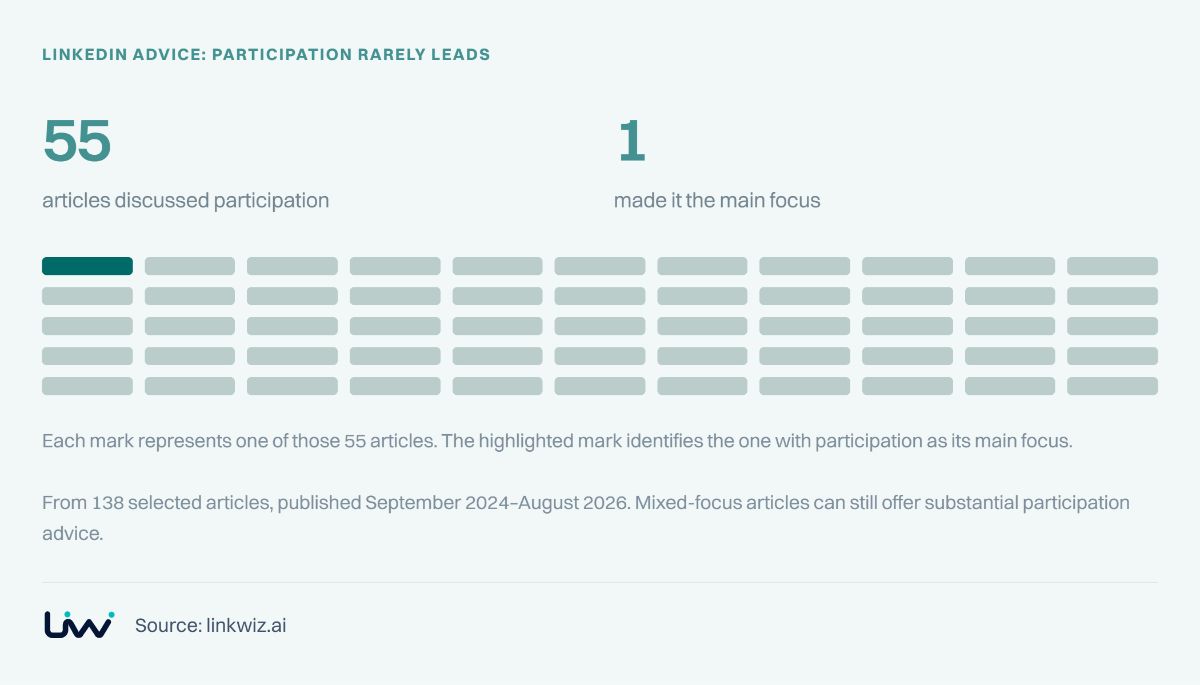
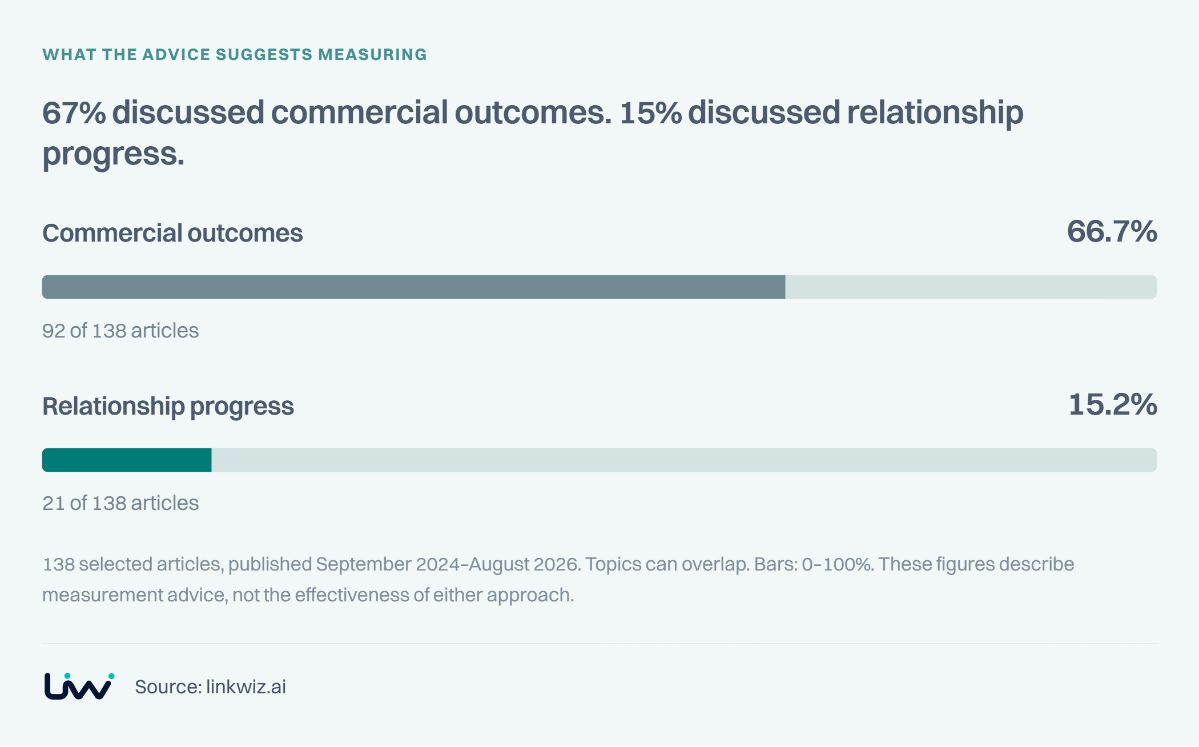
Your team may already have tools for finding prospects, scheduling posts and following up. Yet a weekly review can still leave one question unanswered: where are our people joining conversations that matter to the business?
The answer depends on what you need next. A salesperson needs relevant posts and prospect context. An advocacy manager needs content employees can share. A marketing leader needs to see participation across the team. Those needs overlap, but they lead to different buying decisions.
We reviewed 30 LinkedIn tool families, then revisited the featured products below to build a practical selection guide. Start with the work you want to improve, and use the examples to assess what belongs in your existing setup.
Choose the job you need help with
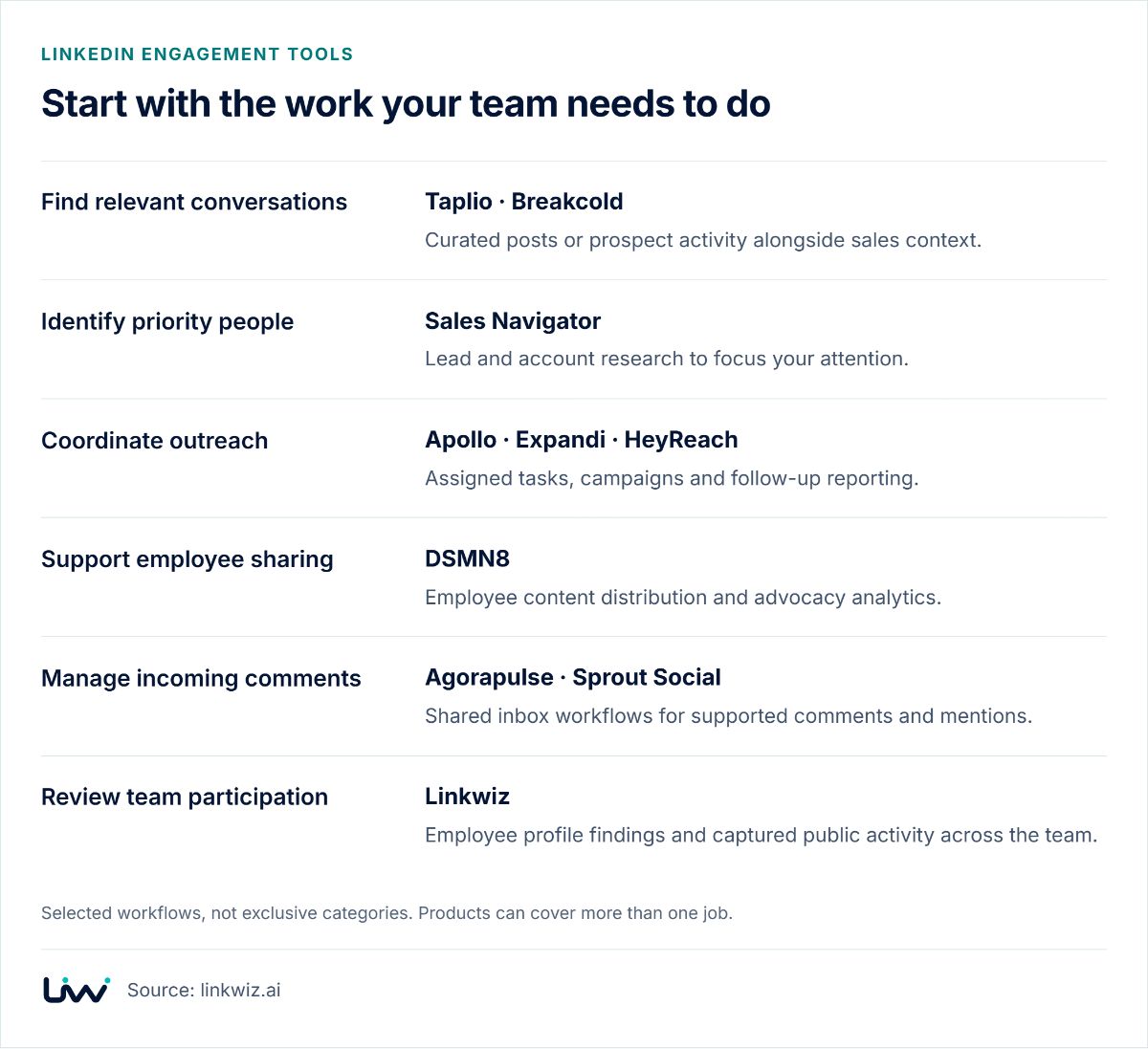
You do not need a tool from every row. Use this map to identify the missing workflow, then check whether something you already use can cover it. Products can span several rows; these are useful starting points, not exclusive categories.
Start with the work your team needs to do
Selected workflows, not exclusive categories. Products can cover more than one job.
 Source: linkwiz.ai
A useful product demo should follow your actual workflow: choose a relevant person, find a conversation, contribute, and bring the result into the next team review. Ask the vendor to show which steps it supports and where your team will work elsewhere.
Find relevant conversations
Taplio: build a routine around relevant posts
Taplio is worth considering when people want a more focused place to engage than the main LinkedIn feed. Its curated content lists organize posts around topics, industries and creators, with tools to write a reply or use Smart Reply suggestions. Its Comments tab also supports replying to comments on your own posts and retrieving comments from another public post by URL.
What to check: can employees find the specific people and discussions your strategy prioritizes? Try a small list of prospects and industry voices, then assess the relevance of the posts and the resulting conversations. Our Taplio and Linkwiz guide explores the broader team workflow.
Breakcold: keep prospect activity close to the deal
Breakcold’s LinkedIn CRM brings prospect posts and LinkedIn conversations into the sales workflow. A salesperson can engage with a prospect’s posts and keep messages associated with the contact record. That makes it a practical option when the problem is switching between prospect research, conversations and the CRM.
What to check: whether the people, conversations and access permissions your team needs fit the CRM workflow. Include a handoff between colleagues in the demo, rather than looking only at one rep’s activity. See the Breakcold workflow comparison.
Sales Navigator: decide whose attention matters
Sales Navigator helps a team identify and organize priority leads and accounts. Its usage reports include searches, saved leads and other selling activity, with date comparisons available to eligible administrators.
What to check: how the team will turn priority accounts into a practical engagement list. In an account review, connect relevant public conversations with those priorities, and confirm a person’s employer before treating their activity as coverage of a target account. Our Sales Navigator guide develops that handoff.
Coordinate outreach
Apollo: give engagement an owner and a deadline
Apollo’s LinkedIn sequence tasks include Interact with post, alongside profile visits, connection requests and messages. The assigned rep completes the action on LinkedIn and marks the task complete in Apollo. This puts participation inside a workflow the sales team already follows.
What to check: what you need at the next account review. Task completion helps manage execution. If managers also want to discuss the contribution, decide how the actual post or comment will reach that review. Put a specific post and a useful reason to engage into the brief when you have them.
Expandi and HeyReach: manage outreach across campaigns and accounts
Expandi’s campaign statistics let you inspect steps and the leads associated with them. HeyReach’s dashboard organizes performance by dates, campaigns and LinkedIn accounts. These are useful controls when the operational challenge is managing outreach and following up consistently.
What to check: which decisions the reports support. Campaign replies can guide sequence changes. A team discussion about useful public contributions needs the relevant posts and comments as well. Keep those reporting needs explicit when evaluating your setup. See the Expandi and Linkwiz workflow.
Support employee sharing
DSMN8: organize advocacy and assess shared content
DSMN8’s advocacy analytics includes individual and team breakdowns, campaign reporting, exports and UTM tracking. It helps an advocacy manager understand which employee-shared content attracts engagement and sends traffic to the website.
What to check: whether your program is primarily about distributing useful content, joining relevant conversations, or both. Build the reporting brief around those priorities. For example, ask to see how you would review a campaign’s employee shares alongside contributions on customers’ or industry peers’ posts. The DSMN8 and Linkwiz guide explains a complementary approach.
Manage incoming comments
Agorapulse and Sprout Social: help the social team respond
Agorapulse’s Inbox brings supported LinkedIn comments and mentions into the team’s response workflow. Sprout Social’s Smart Inbox documentation sets out the LinkedIn message types it supports. These tools are relevant when comments need ownership and timely responses across a social team.
What to check: the account types and message types included, along with assignment and reporting. Bring a real example of a conversation you need to handle. A report about the social team’s replies and a review of employees joining discussions elsewhere serve different management needs. See the Agorapulse workflow guide.
Review team participation
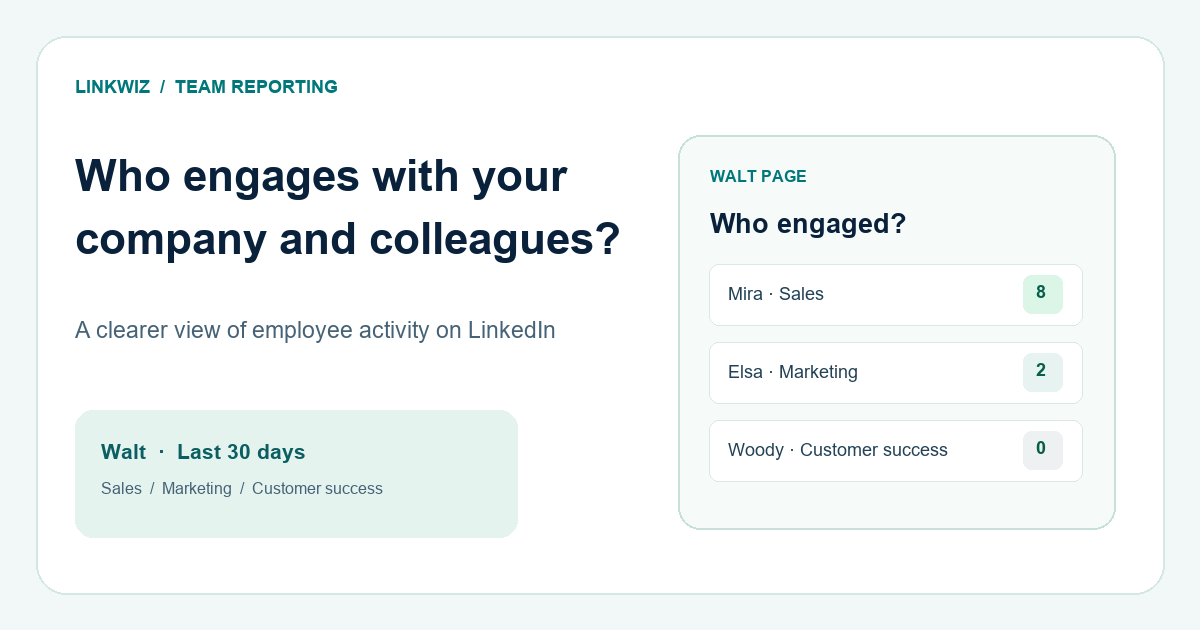
Linkwiz is relevant when the company needs a shared view of employee profiles and public activity. Activity Tracking brings captured posts and interactions together for selected employees. The Interactions view separates activity with colleagues and the company Page from activity with people and Pages outside the organization.
Example: before an account meeting, a sales leader wants to understand how the account executive, solution consultant and founder have participated in relevant public conversations. Use External network to find the people and Pages they engaged with, then inspect the supporting activity. Bring useful context into the account discussion and keep the agreed follow-up in the CRM.
5 comments · 6 reactions · 1 repost
4 comments · 5 reactions · 1 repost
3 comments · 4 reactions · 1 repost
See how selected people support company content and participate in colleagues’ conversations.
4 comments · 6 reactions · 1 repost
3 comments · 5 reactions · 1 repost
2 comments · 3 reactions
Review observed interactions beyond your organization, including people and companies relevant to your account strategy.
Example: switch between External network and Team & company to explore the two views.
This helps answer a practical leadership question: is participation concentrated around employer content, or does the team also contribute beyond it? Review the context before interpreting a count. Public interactions alone do not establish buying intent, and the report reflects captured activity rather than every possible interaction.
Linkwiz also provides a focused feed of company and colleague posts. For help deciding how to contribute, connect Linkwiz to an AI assistant such as ChatGPT or Claude, or discuss the report with the Linkwiz agent in Slack. The feed provides the posts; the connected assistant helps interpret them and develop a response with the employee.
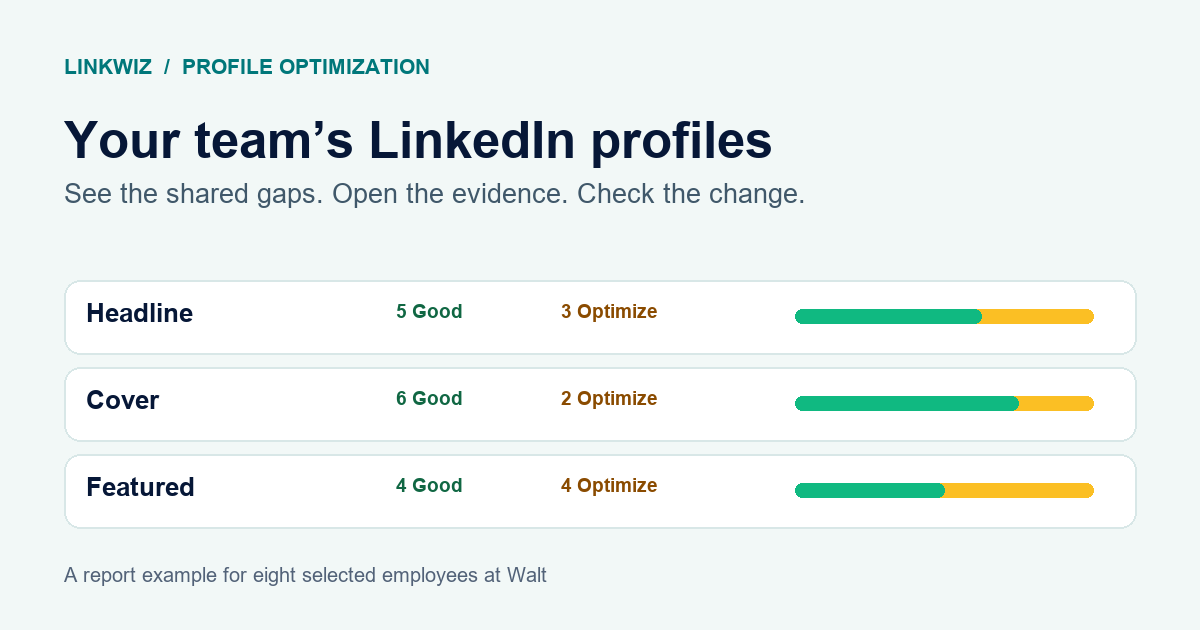
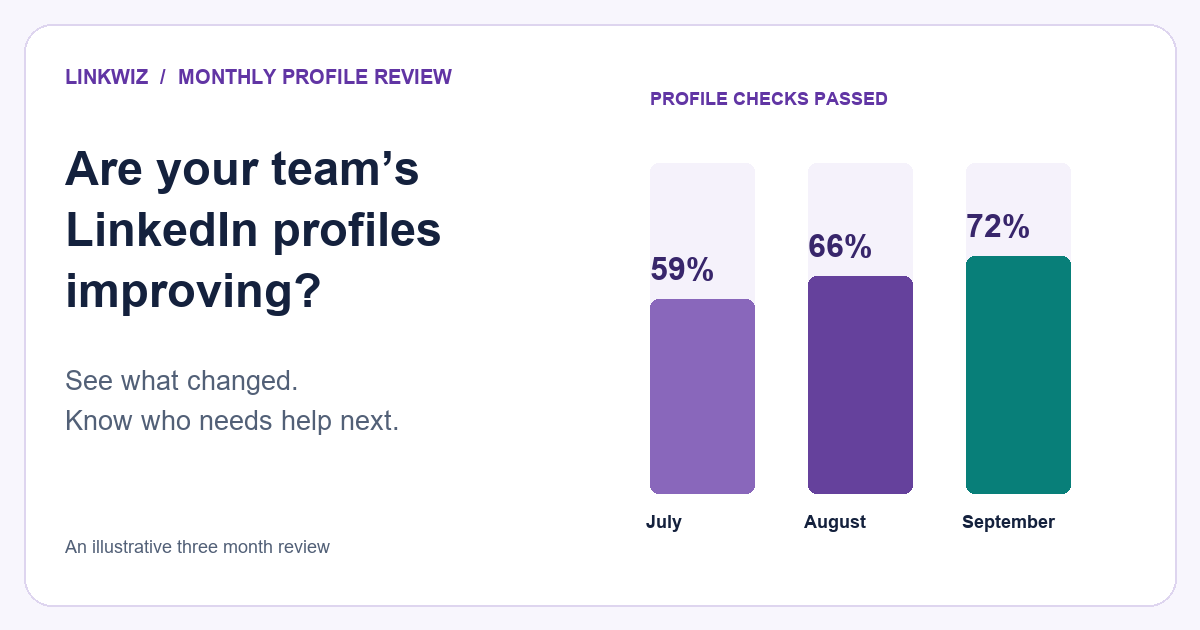
Profile findings add another useful step: improve how employees present their roles and company when someone visits after an interaction. For the workflow, see reviewing team engagement and helping employees find their next contribution.
The buying decision is whether this shared view would change what your team does next. Keep the prospecting, CRM, advocacy and inbox tools that already work. Add the missing capability where it gives managers and employees a clearer next step.
About this comparison
Linkwiz prepared the original documentation review of 30 unique product families, supported by 102 evidence records collected on September 18, 2026. Linkwiz was outside that sample. The featured vendor documentation was revisited on October 15, 2026 for this practical guide. We did not conduct authenticated product tests or measure commercial outcomes.
The map highlights selected workflows, not complete feature inventories or a ranking. Products overlap, and combinations described here are editorial suggestions, not claims of direct integrations. The original classification results remain unchanged in the full product assessment and methodology. Ambiguous or missing documentation does not establish that a feature is absent.
For the complete 30-product record, download the edition 2.2 research data. ProspectIn is counted within the Waalaxy family. The separate article and community samples do not enter the 30-product total.
Product sources are linked beside the relevant claims. Linkwiz capabilities are described on the Activity Tracking and integrations pages. Share corrections with the product and source URL at research@linkwiz.ai.