Seventeen reactions. It would be easy to scroll past.
But Stojanka Berry’s comment had received 60,036 impressions.
She had suggested a simple way to start using AI: ask it to plan a day trip, then explain your interests, budget and how you’ll get around.
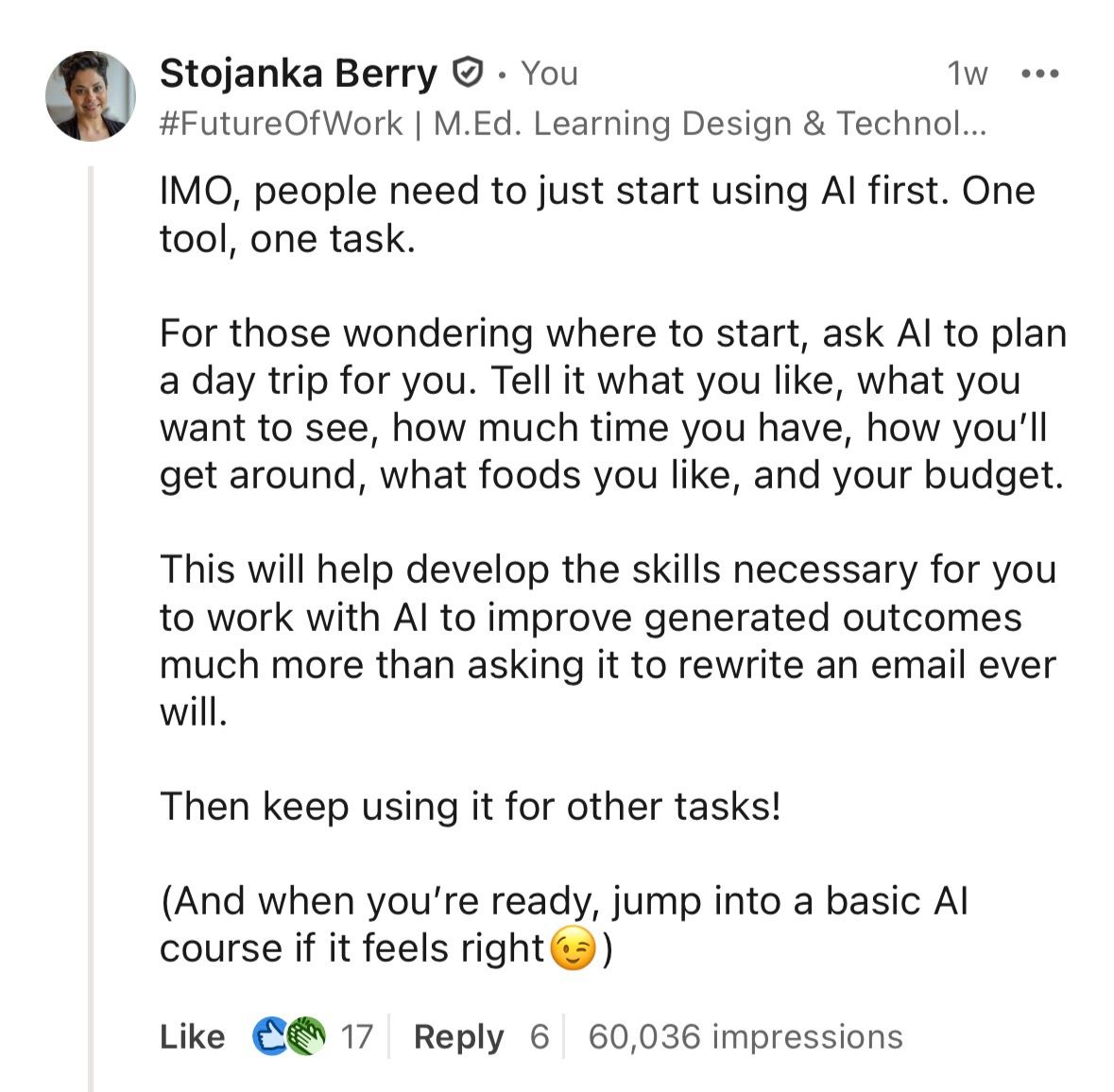
Stojanka Berry’s screenshot shows 60,036 comment impressions and 17 reactions. View Stojanka Berry’s source post.
That gap between reactions and impressions caught our attention. We found seven examples with screenshots showing what people wrote, the visibility their comments received and, in some cases, how the discussion continued.
If your LinkedIn plan focuses entirely on publishing, these examples give you a reason to make room for commenting.
LinkedIn counts repeated views and your own views as comment impressions. The figures below are impressions, not unique people. LinkedIn explains the metric here.
A comment can receive far more impressions than its reactions suggest
Fabio Ciucci pointed out that Sam Altman was talking more about electricity needs in his public discussions of AI. His comment’s screenshot shows 51 reactions and 210,330 impressions, along with nine replies. View Fabio Ciucci’s source post.


Two author-shared screenshots show substantial impressions alongside modest reaction counts. Each pair comes from the same screenshot.
Don’t judge a comment’s visibility by its reactions alone. LinkedIn shows personal comment impressions to the commenter. Other people browsing the thread can see the reactions, but not that impression count.
Before dismissing an employee’s comment as unnoticed, ask what impressions they can see. Then consider whether the discussion is relevant to your business. A large count does not tell you who saw it.
Useful participation takes more than one form
Read the comments themselves and the variety stands out. One person notices a detail in a video. Another recommends a resource. Someone else joins in with a joke.
Rob Maas picked out a moment in a recruitment video
A person’s tie is being tightened. Their expression catches Rob Maas’s attention. In his Dutch comment, Rob says that moment communicates more than a lengthy vacancy description and points to the enjoyment the people in the video seem to take in their work.
Rob identifies the original post as Jesse Geul’s. His screenshot shows 102,157 impressions, 47 reactions and two replies. His comment gives someone in recruitment or employer branding a specific detail to discuss: how a brief scene conveys what working there might feel like. View Rob Maas’s source post.
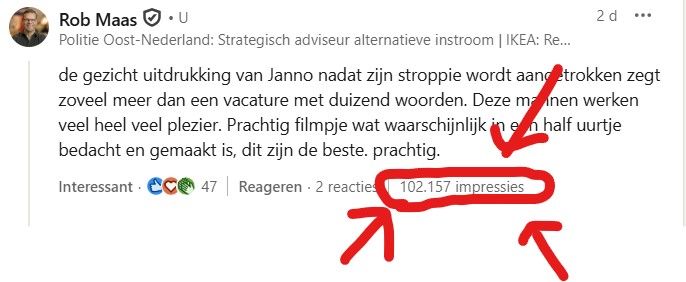
Rob Maas’s comment identifies a specific moment in a recruitment video. The paragraph above summarizes it in English.
Elizabeth Marchuk recommended two places to learn about AI
Elizabeth Marchuk recommended Karpathy’s channel and DeepLearning.AI in a comment about learning AI. The screenshot she shared shows 29,327 impressions and 17 reactions. View Elizabeth Marchuk’s source post.
Lian Turc joined in with humor
Lian Turc responded to a sales video with a joke about a Corvette and the seller’s persuasiveness. His screenshot shows more than 16,000 impressions, alongside 26 reactions and five replies.
A response that fits the moment does not need to become a miniature article. View Lian Turc’s source post.
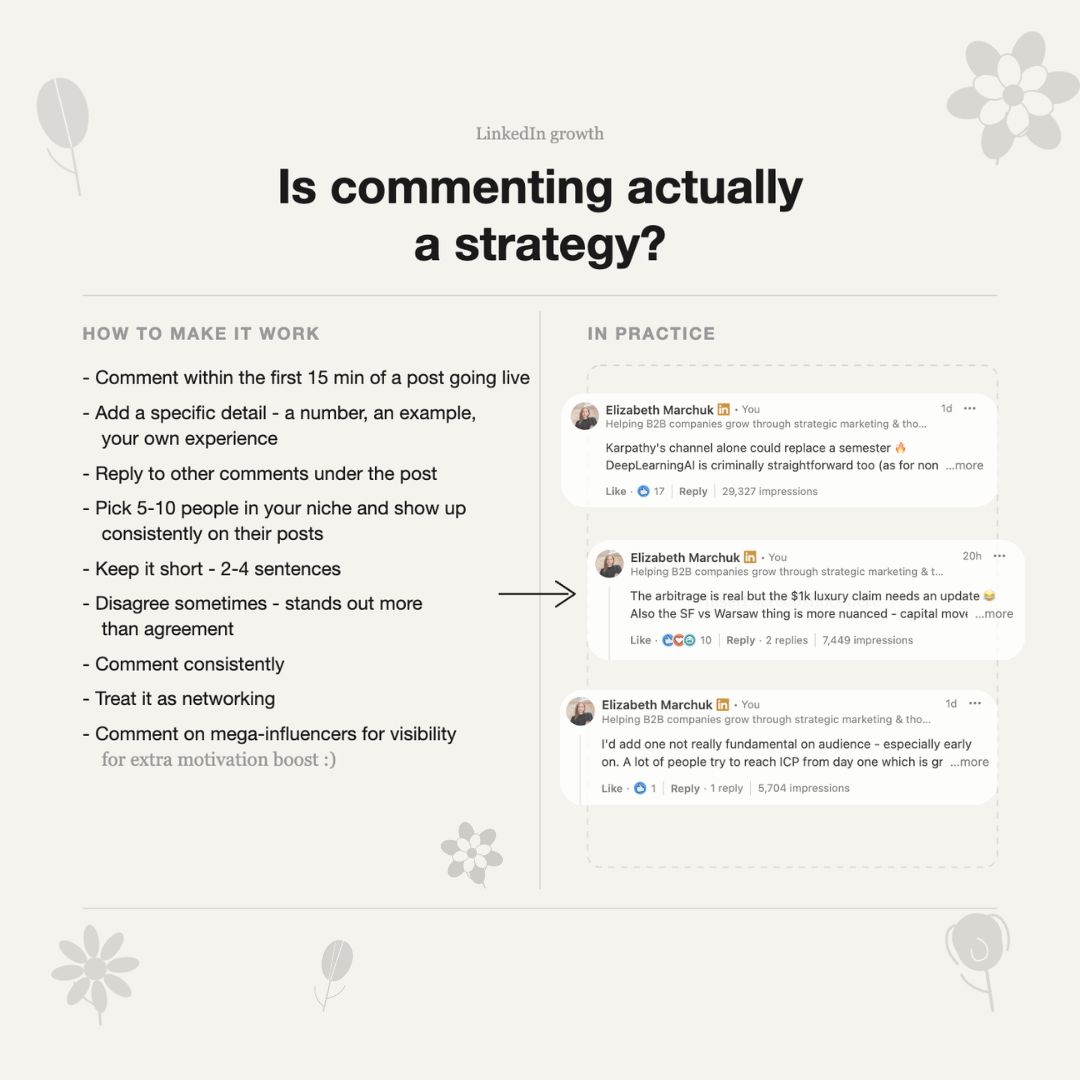

Elizabeth offers learning resources; Lian responds to a humorous moment. The screenshots document visibility for two different contributions.
Give employees room to respond in a way that fits the post. Rob’s detailed observation and Lian’s joke belong to different moments. Turning both into the same formal response would lose what makes them recognizable.
The reply can be as interesting as the impression count
Two colleagues kept the joke going
Aaryaman Singh posted about someone becoming an admissions consultant shortly after getting into business school. Kunwar Raj replied that he was thinking of applying that year. Aaryaman continued the joke, offering consulting help during office hours.
Both work at SuperPen, according to the roles visible in the screenshot. Kunwar’s comment shows 12,240 impressions. They are joking with each other in public, giving readers a glimpse of how two colleagues get along. View Kunwar Raj’s source post.

Kunwar Raj’s comment and Aaryaman Singh’s reply, with both colleagues’ roles visible.
A perspective on career gaps drew a response from the author
Chioma Juliet Azubuike commented under Raj Vaibhav’s post that a career gap does not tell the whole story of a person. She emphasized what someone can contribute now.
Raj replies that a gap can reflect life happening rather than a lack of competence. Chioma’s screenshot shows their exchange alongside 73,518 impressions, 55 reactions and nine replies on her comment. View Chioma Juliet Azubuike’s source post.

Chioma Juliet Azubuike’s screenshot shows 73,518 impressions and a reply from the original author. Her accompanying post reports a different total; see the source notes below.
When reviewing your team’s comments, look at what people said back. Did the author ask a question, offer another example or continue the discussion? That gives you something specific to follow up on.
Give your team a relevant conversation to join
Start with posts your employees have a reason to care about. Send a salesperson a company announcement that relates to a question customers keep asking. Share a project post with a colleague who helped deliver it. Tell them why you thought of them.
Linkwiz’s Activity Tracking feed helps you find company and colleague posts. Employees can open a post and discuss what to say with ChatGPT, Claude or Codex connected to Linkwiz, or privately with the Linkwiz agent in Slack. The assistant can help turn their experience into a comment.
The weekly engagement recommendations guide explains that workflow. For more help with the contribution itself, see the LinkedIn comments guide.
The next time you ask your team to engage on LinkedIn, include a post and a reason it matters to them. Give them something worth responding to.
The seven examples and their sources
Impression and reaction counts below were read from the same archived screenshots. Names link to the authors’ profiles. Source links open the posts where they shared the images.
| Person | Comment impressions | Reactions | Source post date | Evidence |
|---|---|---|---|---|
| Stojanka Berry | 60,036 | 17 | 2026-02-18 | Original post |
| Fabio Ciucci | 210,330 | 51 | 2025-11-24 | Original post |
| Rob Maas | 102,157 | 47 | 2025-06-28 | Original post |
| Elizabeth Marchuk | 29,327 | 17 | 2026-04-10 | Original post |
| Lian Turc | 16,765 | 26 | 2025-02-20 | Original post |
| Kunwar Raj | 12,240 | 13 | 2025-03-26 | Original post |
| Chioma Juliet Azubuike | 73,518 | 55 | 2026-05-13 | Original post |
About these examples
Linkwiz reviewed publicly shared comment results on 15 October 2026. We selected these seven examples because the screenshots identify the commenter and show a comment impression count above 10,000. We linked each to the author’s source post and profile, and checked the displayed counts against the archived image.
This is a collection of author-shared examples, not an experiment or a representative sample of LinkedIn comments. We have not independently authenticated the authors’ private analytics. The examples cannot establish typical results, a best time to comment, a causal ranking factor or a sales outcome. Our descriptions of what each person contributed are editorial interpretations of the visible comments.
Source notes: Lian’s screenshot shows 16,765 impressions; his post text says 16,756. We use “more than 16,000” in the narrative. Chioma’s screenshot shows 73,518; her post text says 75,518. We use the screenshot figure. Elizabeth’s 29,327 refers to one comment, rather than the mixed activity total discussed in her post. Kunwar’s 12,240 also refers to one comment, rather than his claimed weekly total.
The counts capture what was visible when the authors took their screenshots. LinkedIn’s impression definition includes repeat views and self-views. The screenshots do not disclose who saw the comments or how closely they read them. These impression figures come from the authors’ images, not from Linkwiz reports.