
Linkwiz guides
Choose a LinkedIn profile picture people can recognize.
Use a clear, current photo of yourself. Then check who can see it, especially people who do not know you yet.
Your photo appears beside your name when you comment and send connection requests. A recognizable portrait helps people connect that activity to the person behind it.
A photo on your profile can still be hidden from a visitor.
Photo visibility and photo quality are two separate decisions. This example shows what changes when the same portrait is visible to someone viewing the public profile.
Photo hidden from public visitors
Public visitor sees no portrait
Photo visible to public visitors

Public visitor can recognize Belle
The people, company and report results in these examples are fictional.
Choose the photo. Then choose its audience.
Make yourself recognizable
Choose a recent photo that looks like you. Crop it close enough that your face is easy to recognize in LinkedIn’s small circular thumbnail. Use clear lighting and a background that does not compete with your face.
If your company is arranging team portraits, the Linkwiz + HeadshotPro workflow explains one option for creating them and helping employees use them. Choose the photo approach that suits your team.
Check the visibility setting
LinkedIn lets you show your photo to connections, your network, all LinkedIn members or anyone. If you want people outside LinkedIn to recognize you too, review the Anyone option and your public profile settings.
Check both the small thumbnail and your public profile view before you finish. A clear portrait does not need a company logo or a matching team background.
Optional: take and refine a phone photo
A phone photo can be enough. Face a window for even light, use a quiet background and ask someone to take the picture at eye level. Crop it so your face remains clear in a small circle.
If you use an AI image editor, ask it to tidy the crop, lighting or background while keeping you recognizable. Check the result against the original before using it.
A prompt you can adapt
Edit this photo for my LinkedIn profile. Crop it to a clear head and shoulders portrait, with room for a circular crop. Adjust exposure and color for natural lighting. Remove distracting background objects and use a simple, neutral background. Preserve my face, skin tone, age, hair, glasses and recognizable appearance. Do not change my facial features or invent clothing, badges or credentials. Keep the result realistic.
Find team profiles whose photos are not publicly visible.
Create your company report in Linkwiz and include your employees’ LinkedIn profiles. Linkwiz reviews 19 checks across Profile, Engagement and Networking. In Profile, the Profile Photo result shows which employees have a publicly visible photo and which need attention.
Use the team matrix to find the people marked Optimize, then review their individual finding. Discuss visibility with the employee before asking them to change it. Linkwiz checks public visibility here; choosing the photo and crop is your separate review.
Is their profile picture visible publicly?
Belle BeaumontSales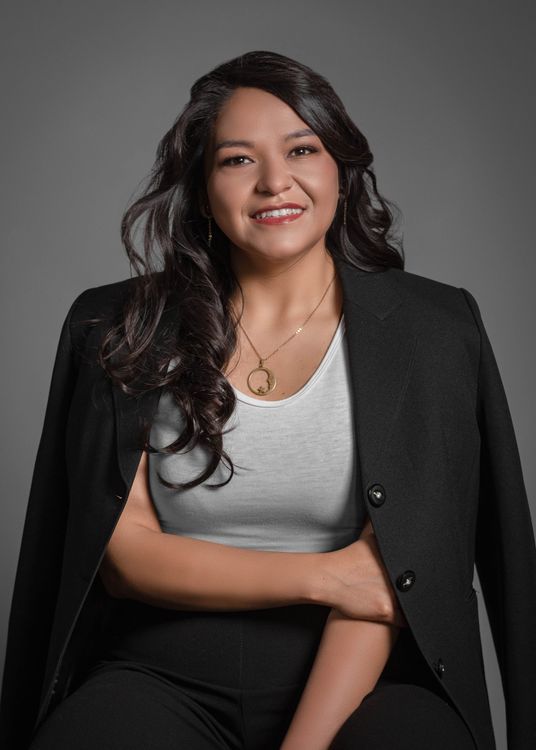 Arielle ReedMarketing
 Jasmine ValeCustomer success
 Peter PanleySales
Belle Beaumont · Individual report · Profile Photo
OptimizeEvidence
The public profile shows a placeholder instead of Belle’s portrait.
Recommended next step
Review the photo visibility setting with Belle. Make it public if she is comfortable being recognized outside her network.
Ready to update it?
Where to update your photo and its visibility
On desktop
Open your LinkedIn profile and select your profile photo. Use Edit to adjust the crop, or Visibility to choose who can see it. Save your changes.
In the mobile app
Open your profile, select your photo, then View or edit. Adjust the photo or its visibility. LinkedIn saves mobile visibility changes automatically.
Public profile settings can also affect what signed out visitors see. Review the public view when changing the photo audience.
Before you move on
- The photo looks like you today.
- Your face is recognizable at thumbnail size.
- You have chosen who can see it and checked the public view.