
LinkedIn's most advanced profile optimizer, which suggests you who to network with and monitors posts you should engage with.


.png)
.png)
AI-Driven LinkedIn profile Optimization
Unlock actionable insights, automate reporting, and elevate your LinkedIn strategy with real-time analytics and seamless team collaboration.
.png)
Custom feeds
Monitor posts worth commenting on, create custom feeds by topic or by persona - thought leaders, colleagues, potential customers, investors etc.
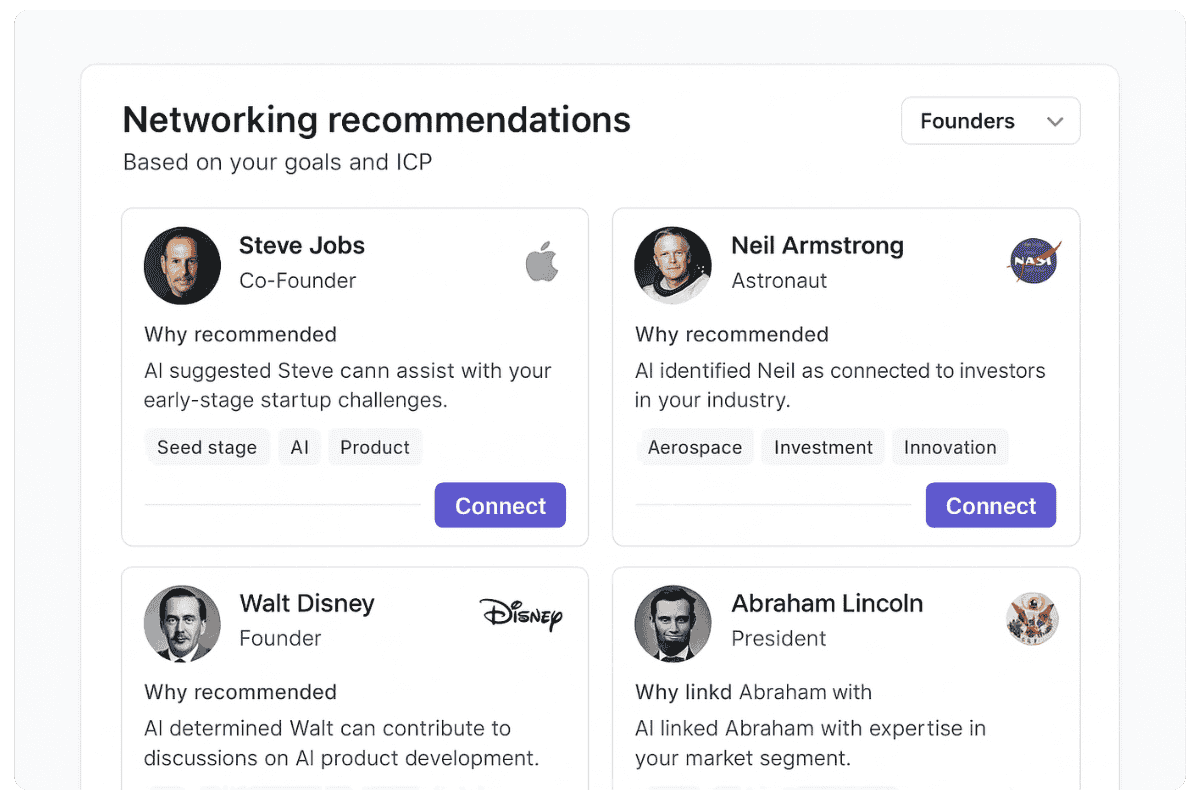
Networking assistant
Provide the AI assistant a description of who you want to network with and get reserach-based connection recommendations on a daily basis.

Optimize your profile to highlight your venture, network with investors, customers, and partners, and build authority by joining important conversations through custom feeds of investor and customer posts.

Used by sales, marketing and business professionals. Improve your profile’s appearance, turn potential customers into conversations, and build authority in your industry by receiving alerts for new posts from your ICPs on topics within your expertise.

Sending CVs is fine, but building authority in your industry greatly increases your chances of landing a better job. Create an authoritative LinkedIn profile and seize opportunities to share your expertise through custom feeds of topic-based posts.


Most LinkedIn profiles is missing at least one critical profile section
despite 100 new connection requests allowed each week
Missing succes metrics, recommendations, testimonials, featured work
on posts that worth your expert opinion
Learn about all the insights we've gathered from reviewing dozens of profiles
Read the researchGrowth require a systematic approach. The features that you use were designed to support you in all four areas of the growth framework. This framework is used accross all social media platforms, LinkedIn included.
Stand out among the top 5% of LinkedIn professionals.
Instantly review your profile with a detailed report covering 23 key sections,
with clear guidance and an easy-to-follow checklist.
Gain leverage over others within 5 minutes following basic optimization steps

Dive deeper into the different sections of your profile and make them stand out

Become a pro: Build authority, relationships and content, become the top 5% on the platform.

Build authority by joining conversations where your insights matter.
Get updates to multiple channels on posts from the people most important to you.
.png)
Research people using an AI research agent.
Find the connection points between you, your company materials and the other person’s background.

Explore trending content and top-performing posts in your industry.
Generate new ideas and fresh perspectives based on your expertise.
Answers to questions you might have about Linkwiz.

We use three methods to review your profile:
Linkwiz analyzes and helps you optimize every key part of your LinkedIn profile to maximize visibility, credibility, and engagement. The 22 sections include:
Download the Linkwiz Chrome extension, enter your profile and start the profile analysis. Each of the 22 sections to optimise will get a score:
Linkwiz supports both individual professionals and teams.
Individuals can optimize their profiles, receive alerts about posts worth engaging with, and access personalized insights for growth.
Teams can connect Linkwiz to shared workspaces like Slack or CRMs to coordinate engagement and track performance. Management dashboards (coming soon) will make it easy to monitor activity and create executive reports.
Contact us for customized enterprise solutions
It is a strategy to increase your visibility on the platform, gain new connections or followers, and find new professional opportunities (whether it’s a job, a customer, a partner or an investor).
It has 4 main components:
Yes. Linkwiz helps improve your LinkedIn Social Selling Index (SSI) across all four official pillars: Establish your professional brand, Find the right people, Engage with insights, and Build relationships. It does this by optimizing 22 key profile sections for credibility, finding relevant people and posts to connect with, alerting you to engagement opportunities, and helping you grow meaningful relationships. In short, Linkwiz aligns your actions with LinkedIn’s own SSI improvement strategy.
The Linkwiz Chrome extension is a browser tool that enhances how you use LinkedIn. It activates only when you browse LinkedIn and provides real-time insights to help you make the most of the platform.
With Linkwiz, you can:
Linkwiz does not automate actions such as sending messages, connection requests, or reactions, which are restricted by LinkedIn. Instead, it works only within your own browser session, reading publicly available information from your profile and network to generate insights, suggestions, and analytics.
We follow strict data protection and privacy standards, never storing your LinkedIn credentials. All processing happens locally or through secure, encrypted channels.
If you purchase a Linkwiz subscription, you can request a full refund within 72 hours of your first payment.
You can also cancel auto-renewal at any time through your account settings, which will stop future charges. However, payments that have already renewed automatically are non-refundable.
To stay updated on product news and feature announcements, follow Leo (Kfir) Shapira (Linkwiz creator) on LinkedIn and the Linkwiz company page. Updates, new feature releases, and best practice tips are shared regularly through those channels